Once the candidate has finished taking the exam ans submitted the answersheet the examiner will correct the answer papers and results will be generated. When candidate view published results his/her performance will be displayed in the "Grade" screen as shown below
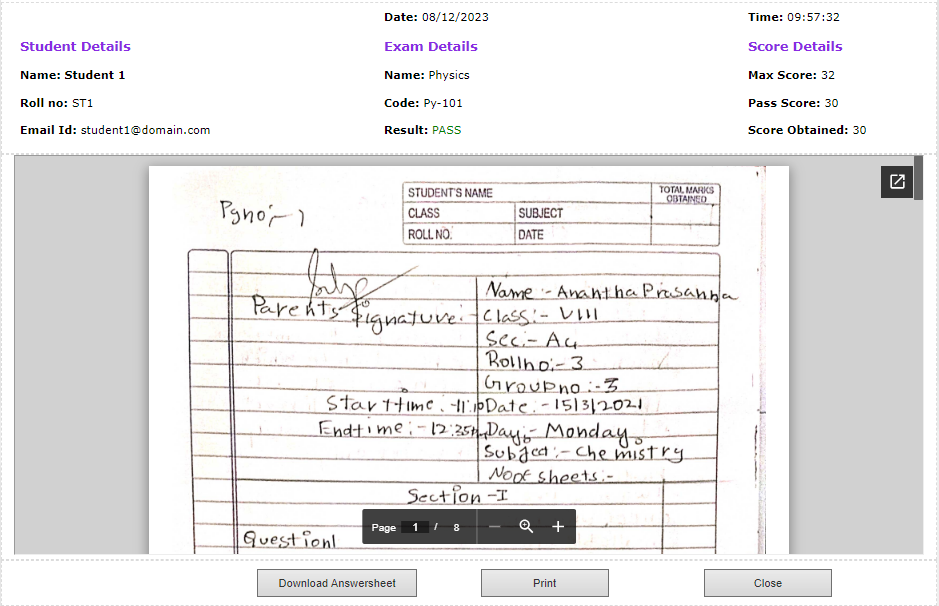
Various information/feature available on Grade screen are :
Date and Time : These fields show the date and time on which exam was taken.
1. Student Details
1.1 Student Name : This field show the name of the student who has taken the exam.
1.2. Roll Number : This field show the roll number of the student who has taken the exam.
1.3 Email Id : This field show the email address of the student who has taken the exam.
2. Exam Details
2.1 Exam Name : Name of the exam taken.
2.2 Exam Code: Code of the exam taken.
2.3 Result : This field will display if the candidate has passed or Failed the exam based on the score obtained in the exam.
3. Score Details
3.1 Max score : This field shows the maximum score that can be obtained in the exam. (Value can be set by instructor in Exam Configuration)
3.2 Pass score : This field shows the minimum score required to pass the exam. (Value can be set by instructor in Exam Configuration)
3.3 Score Obtained : This field shows the score which was obtained by the candidate in exam taken.
Corrected answershet is also displayed which can be downloaded by the students.
Print : Use this option to print the candidate's performance in grade screen format. Use print menu options to show or hide headers and background colors.


